To access the HUNT ME referral program dashboard, enter the email and password you used during registration.
Fill out the form — it takes 2 minutes. A manager will contact you on Telegram, provide free training, and help you get your first result.

Many affiliates treat tracking as a boring technical setup.
They create a tracking link, connect the offer, launch traffic, and assume everything will work. Then the campaign starts getting clicks, the traffic looks alive, but conversions do not appear correctly. The tracker shows one thing, the affiliate dashboard shows another, ROI jumps from positive to negative, and decisions become impossible.
In many cases, the problem is not the offer, the creative, or the traffic source.
The problem is tracking.
Affiliate tracking mistakes do not only create messy reports. They directly affect money. You may pause a profitable campaign because the tracker shows no conversions. Or you may keep scaling a losing campaign because duplicated events create fake profit. You may fail to identify the winning creative because ClickID was lost. You may underestimate a subscription offer because rebills are not passed back. You may overestimate profit because refunds are not tracked.
Earn with HUNT ME — weekly payouts
Tracking adult offers is especially sensitive because the funnel is rarely simple.
One user can generate several events:
If the tracking setup breaks at any stage, the affiliate loses visibility. And when visibility is broken, budget decisions become guesses.
This guide explains why affiliate conversions are lost, how to set up affiliate postback correctly, how ClickID and SubID affiliate marketing tracking should work, what causes tracker and affiliate dashboard discrepancies, and how to check affiliate tracking before launch.
Before fixing tracking errors, it is important to understand the basic chain.
A user sees an ad, clicks it, and goes through a tracking link. The tracker creates a unique ClickID. The user is redirected to a prelander, landing page, or offer page. The ClickID and other parameters are passed through the funnel. If the user completes a target action, the affiliate program records the event and sends a postback to the tracker. The tracker connects that conversion to the original click, source, campaign, GEO, creative, and SubID.
That is the ideal flow.
In practice, every step can break.
Earn with HUNT ME — weekly payouts
The ClickID may not be generated.
The ClickID may not be passed to the offer.
SubID values may be lost during redirects.
The postback may fire without the correct identifier.
Paid, Refund, or Rebill events may not be passed at all.
The tracker may count duplicates.
The affiliate dashboard may show conversions that the tracker cannot attribute.
This is why affiliates lose money from tracking: the campaign may be producing revenue, but the affiliate cannot see where it came from or whether it is real net revenue.
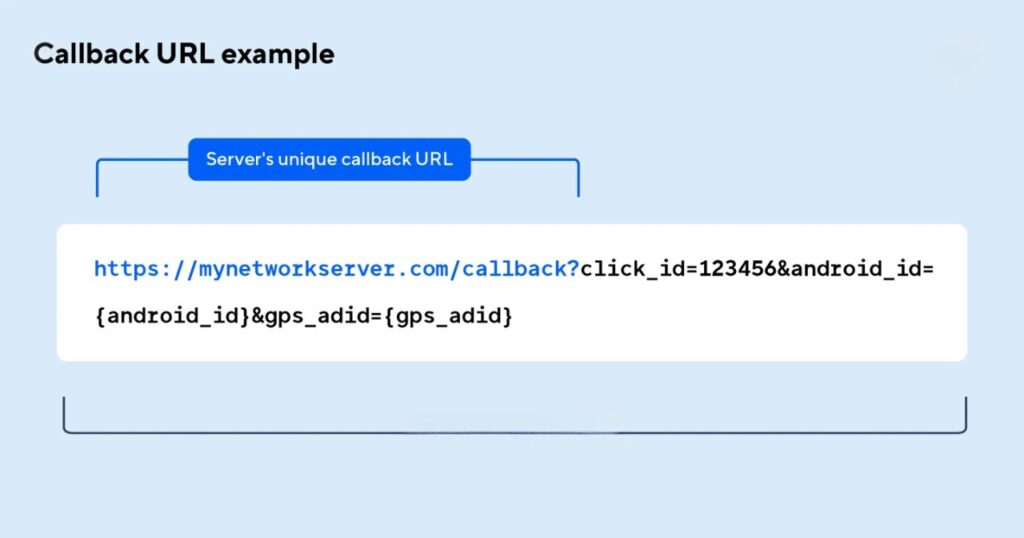
ClickID is the unique identifier of a click.
It connects the user’s original click with the later conversion event.
Without ClickID, affiliate conversion attribution becomes unreliable.
The tracker needs to know:
A common mistake is not passing ClickID into the affiliate offer URL.
Another common mistake is passing it with the wrong parameter name.
For example, the tracker may generate {clickid}, but the affiliate program expects {subid} or {external_id}. If the value is not mapped correctly, the affiliate program cannot return the same ID in the postback.
Then the tracker receives a conversion it cannot match.
The result is simple: the conversion exists, but attribution is broken.
This is one of the most common reasons why affiliate conversions are not tracked correctly.
A proper ClickID setup follows one rule:
The same unique click identifier must be generated, passed to the offer, stored by the affiliate program, and returned in the postback.
If that chain breaks, campaign optimization breaks with it.
ClickID identifies the individual click.
SubID identifies the structure behind that click.
SubID tracking helps you understand which parts of the campaign are working.
A good SubID structure can include:
How to set up SubID affiliate marketing tracking properly?
Plan the structure before launch.
For example:
This allows you to optimize precisely.
If one creative is profitable, you can scale it.
If one placement sends low-quality users, you can block it.
If one GEO has high refunds, you can separate it.
A common mistake is putting all data into one messy SubID field or not using SubIDs at all.
That creates a reporting problem later.
You may see conversions, but you cannot understand what generated them. At that point, optimization becomes guesswork.
In adult offers, where traffic quality, payment behavior, and retention matter, SubID tracking is not optional. It is the foundation of campaign control.
UTM tags are useful when working with owned websites, prelanders, analytics tools, and content funnels.
But UTM tags do not replace ClickID and SubID.
They support broader reporting, while ClickID and SubID support conversion attribution and campaign optimization.
Common UTM tracking mistakes affiliate marketing teams make include:
For example, Facebook, facebook, fb, and FB_ads may all be treated as different sources in analytics.
This makes reporting messy and unreliable.
Create a simple naming convention before launch.
Use one name for each source, campaign, creative, and GEO.
Consistency is boring until you need to compare performance across dozens of campaigns.
Redirects are one of the most common places where tracking breaks.
Lost tracking parameters in redirects happen when one step in the funnel does not pass the query string forward.
Example:
The tracker sends the user to a prelander with:
?clickid=abc123&sub1=creative_a&sub2=us_mobile
But the prelander sends the user to the offer using a clean link without those parameters.
The ClickID and SubIDs disappear.
When the affiliate program later sends a postback, the tracker cannot connect the conversion to the original click.
Affiliate redirect tracking errors can also happen because of:
Always test the full user path manually.
Open developer tools, check the Network tab, and confirm that ClickID and SubID values reach the final offer URL intact.
If the parameters disappear before the offer, postback tracking will not work properly.
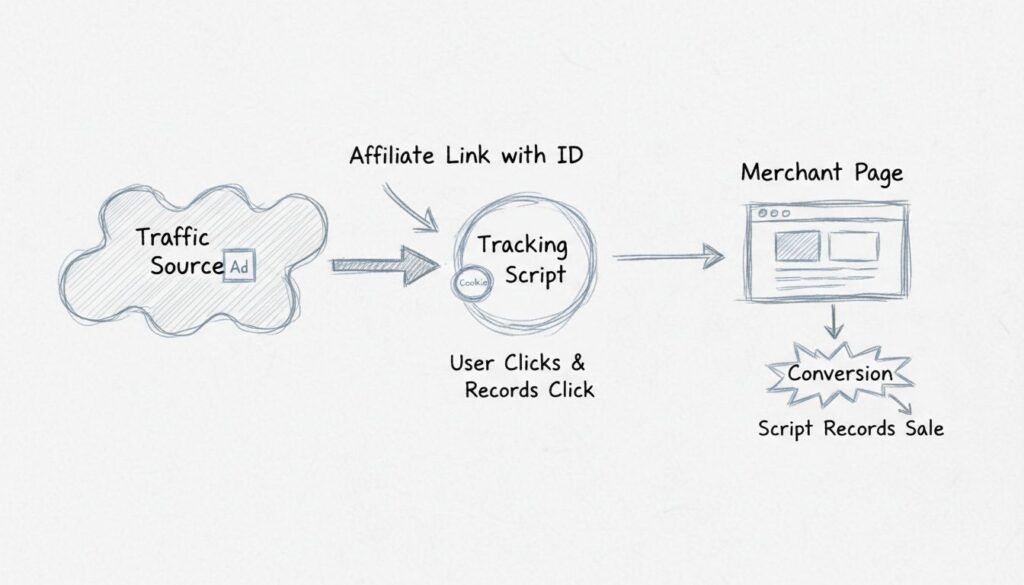
Postback is the signal the affiliate program sends back to your tracker when a conversion or event happens.
Affiliate postback errors are one of the main reasons why affiliate leads are not tracked.
A typical postback URL may include:
The exact structure depends on the tracker and affiliate program.
The important parts are:
Common postback errors include:
Postback troubleshooting affiliate marketing campaigns should always begin with a test event.
Do not wait until real budget is already spent.
In adult affiliate tracking, one event is not enough.
Tracking only Lead gives you a very incomplete view of the funnel.
A full event structure should include:
Lead means the user registered or completed the first required action.
Approved means the lead passed validation.
Paid means the user completed a payment.
Rebill means the user generated a recurring payment.
Refund means a payment was returned.
Chargeback means the payment was disputed.
If you track only Lead, you may think a campaign is profitable when users never pay.
If you do not track Paid, you cannot see real payment conversion.
If you do not track Rebill, you may undervalue subscription traffic.
If you do not track Refund, you may overestimate ROI.
Lead Approved Paid Refund Rebill events should be connected to the same ClickID when they belong to the same user path.
That is how to track affiliate revenue accurately across the full funnel.
Tracker and affiliate dashboard discrepancies are normal within a small range.
But large discrepancies are a warning sign.
Common reasons include:
For example, the affiliate dashboard may show a lead immediately, while the tracker receives the approved or paid event later.
Or the tracker may assign a conversion to one day, while the affiliate dashboard assigns it to another because of time zone settings.
Small reporting differences are not always a problem.
But if the gap is large, consistent, or growing, it should be investigated.
The goal is not to make every number identical in real time. The goal is to understand why the difference exists and whether it affects campaign decisions.
Cookies and affiliate tracking issues have become more serious over time.
Browser privacy restrictions, third-party cookie limits, tracking prevention, private browsing, mobile environments, and ad blockers all make client-side attribution less reliable.
If your tracking depends only on browser pixels, some events may be lost.
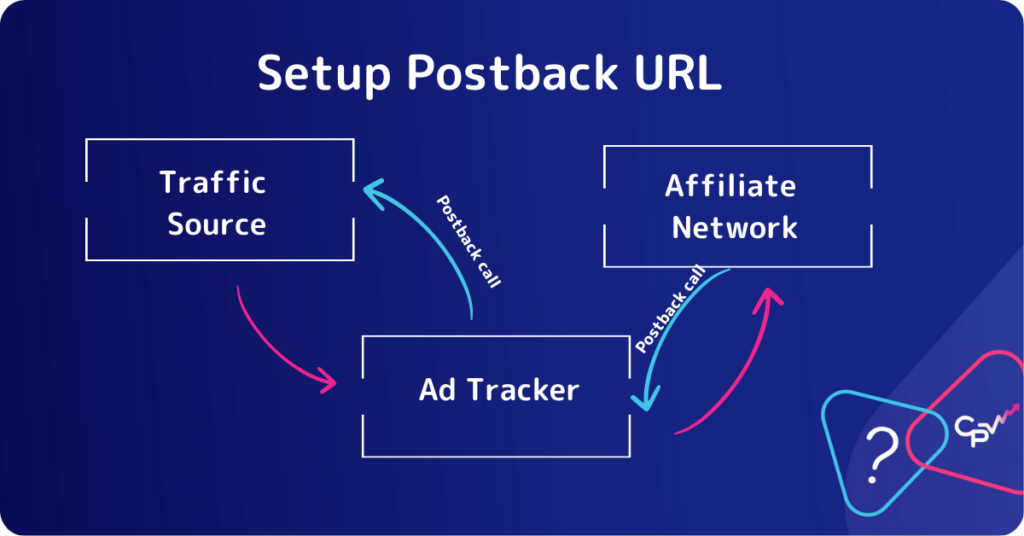
Server-side tracking affiliate marketing setups are more reliable because the conversion signal is sent from server to server.
The user click is recorded by the tracker. The ClickID is passed to the affiliate program. When conversion happens, the affiliate program sends the event directly to the tracker through postback.
This reduces dependency on the user’s browser.
Server-side tracking is especially important in adult offers, where mobile traffic, privacy tools, and multi-step funnels can make browser-based tracking weaker.
Client-side pixels may still be useful in some setups, but they should not be the only source of truth for revenue attribution.
Postback testing before launch is one of the simplest ways to avoid losing money.
Before spending budget, run a tracking audit.
Check:
If a test conversion cannot be tracked correctly, do not launch traffic.
Launching before tracking is tested means paying for data you may never be able to use.
A setup that works during a small test can still create problems after launch.
After traffic starts, monitor:
This is especially important during scaling.
When volume grows, small tracking errors become expensive quickly.
A 2% tracking issue may be tolerable during a small test. At scale, it can hide or distort thousands of dollars in revenue.
Use this affiliate tracking audit checklist before and during launch:
This checklist is not technical bureaucracy.
It protects budget.
The most common affiliate tracking setup errors include:
Each mistake can lead to poor optimization.
Together, they can make campaign data almost useless.
If affiliate conversions are not tracked, follow a step-by-step process.
If conversions exist in the affiliate dashboard but not in your tracker, the issue is usually postback, ClickID matching, or tracker settings.
If conversions do not appear on either side, the problem may be earlier in the funnel: redirects, offer link, landing page, event trigger, or traffic quality.
Do not optimize the campaign until the data is trustworthy.
Tracking is not a technical detail separate from campaign performance.
It is the system that tells you where money is made, where money is lost, and which decisions are safe.
In adult offers, incomplete tracking can hide paid events, rebills, refunds, rejected leads, and payout adjustments. It can make profitable campaigns look weak and losing campaigns look strong.
A clean tracking setup gives you control:
Before launching traffic, test the chain.
During scaling, audit the numbers.
When discrepancies appear, diagnose them before changing the funnel.
That is how tracking stops being a headache and becomes one of the strongest tools for protecting affiliate profit.
Affiliate conversions may not be tracked because ClickID is missing, SubIDs are lost, postback is misconfigured, redirects remove parameters, events are delayed, or the tracker and affiliate dashboard use different attribution rules.
ClickID is a unique identifier assigned to each click. It allows the tracker to connect a later conversion back to the original click, source, campaign, creative, and SubID.
SubID is used to segment traffic by source, campaign, creative, GEO, placement, device, or other variables. It helps affiliates optimize campaigns at a detailed level.
An affiliate postback should send the original ClickID, event status, payout, and other required values from the affiliate program back to the tracker through a server-to-server URL.
Numbers may differ because of delayed postbacks, missing events, duplicate conversions, different time zones, attribution windows, refunds, chargebacks, or ClickID and SubID issues.
Important events include Lead, Approved, Paid, Rebill, Refund, Chargeback where available, and payout adjustments. Tracking only Lead is usually not enough.
Registration takes 2 minutes. No experience needed — we'll teach you everything.
Just fill out the form
Registration takes 2 minutes. No experience needed — we'll teach you everything.