To access the HUNTME referral program dashboard, enter the email and password you used during registration.
Fill out the form — it takes 2 minutes. A manager will contact you on Telegram, provide free training, and help you get your first result.

Many affiliates run into the same frustrating situation: traffic is flowing, leads are showing up, but revenue in the tracker or dashboard doesn’t match expectations. Some conversions simply never “arrive” in your reporting. Sometimes the issue is a broken parameter, sometimes redirects strip identifiers, and sometimes events are mapped incorrectly inside the affiliate platform.
In 2026 this problem is even more visible. Privacy protections, cookie limits, and tracking prevention across browsers and mobile environments make server-side conversion tracking a must-have. That’s why postback tracking (also called S2S) sits at the core of modern affiliate infrastructure.
This guide explains what an S2S postback is, which affiliate tracking events you must track, and how to validate your setup quickly—so you don’t lose money to missing or misattributed conversions.
A server-to-server postback (S2S postback) is a request sent from the affiliate network (or advertiser) to your tracker when a conversion happens.
In simple terms:
Earn with HUNT ME — weekly payouts
User clicks → network records an event → network sends a postback → your tracker logs the conversion.
This is why affiliate postback tracking is more reliable than browser-based pixels:
However, even with S2S, the chain can break. The most common failure points are:
That’s why you need a clean tracking architecture.
A reliable baseline looks like this:
Traffic source → tracker → offer/affiliate network → postback → tracker/analytics
The key element is a unique click identifier. Most systems use one of the following:
Your tracker generates that ID on click, passes it to the affiliate network, and then the network returns it back via the affiliate postback when an event fires. If the click ID is missing, the conversion can’t be attributed.
Earn with HUNT ME — weekly payouts
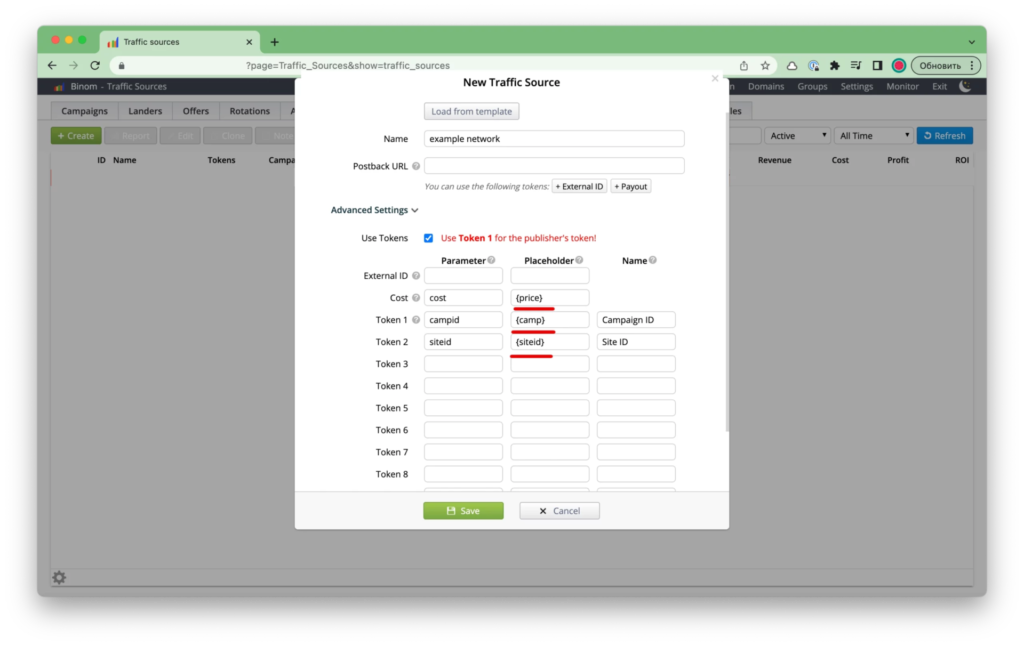
This is why structured subID tracking (subid) is common in performance marketing: it lets you encode campaign-level info so you can optimize with confidence.
A lot of affiliates optimize too early—based on the fastest event they see (usually a lead). But “lead” and “money” can be very different outcomes.
Here’s a practical event set you should aim for:
Why this matters:
If you optimize only for leads, you can scale a losing funnel.
Example:
“Lead volume” looks great. Profit does not.
In 2026, the affiliates who win are those who track and optimize on final revenue events: paid, subscription rebill tracking, and refunds.
One of the biggest sources of confusion is mixing “status events” with “revenue events”.
If your reporting doesn’t include paid, rebill, and refunds, you’re blind to actual profitability.
At minimum, your system needs a unique click identifier:
On click:

In addition, you should almost always pass subid for deeper reporting:
Other helpful parameters (when supported and appropriate):
This is how you move from “I got conversions” to “I know which creative produced paid customers.”
Most affiliate stacks use one of these models.
This is the classic:
Your tracker receives:
This is the backbone of postback tracking.
In some paid systems, you also push conversion signals back to the ad network so its algorithm can optimize. The chain becomes:
source → tracker → network → postback → tracker → source
This improves optimization—but only if your event mapping is correct (ideally use paid events, not just leads).
A common question is webhook vs postback:
In practice, affiliates often use both:
Before scaling, do a quick validation test:
This quick audit prevents days of “why is revenue missing?” debugging.
Here are the most common issues behind missing conversions:
If you’ve ever searched postback not firing, you’ve probably hit one of these.
Subscriptions don’t behave like one-time CPA. A user can generate multiple financial events.
If you only track the first action (trial or lead), you’re missing the real revenue picture. For subscriptions, you typically want:
Every event must return the same clickid to keep attribution intact.
Also pass:
That way, you can measure:
If your numbers don’t reconcile, use this checklist for postback troubleshooting:
If you fix these, most “missing money” problems disappear.
A correctly configured S2S postback with the right affiliate tracking events is the foundation of clean attribution and predictable profit. When tracking breaks, reporting turns into guesswork—and revenue quietly leaks through missed postback tracking signals, wrong statuses, or incomplete event mapping.
That’s why before you scale any campaign, you should verify your postback URL, confirm click ID tracking (clickid) and subID tracking (subid) are preserved across redirects, and make sure your event stack includes not just leads—but real money events like paid, subscription rebill tracking, and refund/chargeback. A quick test (often under 30 minutes) can save weeks of debugging and a significant chunk of your payouts.
If you’re new to affiliate marketing or launching your first subscription funnel, join HUNT ME.
We’ll help you start with the right tracking foundation: vetted offers, ready-to-use scripts, step-by-step guides, and practical tools so you can build a stable income system instead of “trial-and-error” chaos.
Registration takes 2 minutes. No experience needed — we'll teach you everything.
You just need to fill out the form
Registration takes 2 minutes. No experience needed — we'll teach you everything.